> ## Documentation Index
> Fetch the complete documentation index at: https://docs.morph-data.io/llms.txt
> Use this file to discover all available pages before exploring further.
# morph_project.yml
`morph_project.yml`は、Morphのフレームワークを実行時に使用される設定ファイルです。[`morph new`](../cli-commands/new)コマンドを使用してMorphのプロジェクトを立ち上げると自動的にデフォルトの値が設定されたファイルが作成されます。
```yaml theme={"dark"}
version: '1'
# Framework Settings
default_connection: DUCKDB
source_paths:
- src
# Cloud Settings
profile: default # Defined in the Profile Section in `~/.morph/credentials`
project_id: xxxxxx-xxxxx-xxxx-xxxxx
# Build Settings
build:
# These settings are required when there is no Dockerfile in the project root.
# They define the environment in which the project will be built
runtime: python3.9 # python3.9, python3.10, python3.11, python3.12
framework: morph # morph | streamlit
package_manager: pip # pip, poetry, uv
# These settings are required when there is a Dockerfile in the project root.
# They define how the Docker image will be built
context: .
build_args:
ARG1: value1
ARG2: value2
# Deployment Settings
deployment:
provider: aws
aws:
region: us-east-1
memory: 512
timeout: 30
gcp:
region: us-central1
memory: "1Gi"
cpu: 1
concurrency: 80
timeout: 300
```
## Parameters
使用するプロフィールを設定します。`morph config`コマンドで設定した`~/.morph/credentials`に記載されたプロフィールのうちどれを使用するかを定義します。
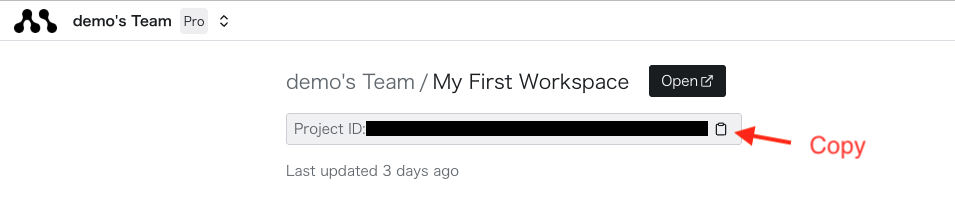
クラウドで作成したProjectのIDを設定します。クラウドのコネクターを使用する場合、デプロイを実行する場合は必須になります。
IDはクラウド上の個別プロジェクトページから取得することができます。
 デフォルトのDB接続を指定します。SQLファイルでconfig関数の中でconnectionを指定しなかった場合は自動的にこの接続が使用されます。
設定をする場合は、configのconnectionに設定と同様にコネクション名を設定してください。
**予約語**
以下の予約語は、コネクションを作成しなくても使用できます。
* `DUCKDB`: DuckDBがデータベースエンジンとして使用されます。
* `MORPH_BUILTIN_DB`: MorphのビルトインPostgreSQLがデータベースエンジンとして使用されます。
ソースパスを指定します。
ソースパスとして指定をしたディレクトリ以下にあるファイルがMorph上で実行可能なソースコードとして扱われます。
プロジェクトで使用するPythonのバージョンを設定します。
使用可能なPythonのバージョン
* `python3.9`
* `python3.10`
* `python3.11`
* `python3.12`
プロジェクトで使用するフレームワークを設定します。
プロジェクトルートに `Dockerfile` が存在しない場合は、ここに設定したフレームワークに適したDockerfileが自動で使用されてデプロイされます。
`Dockerfile` が存在する場合は、プロジェクト内に存在している `Dockerfile` が優先して使用されます。
使用可能なフレームワーク
* `morph`
* `streamlit`
プロジェクトで使用するPythonのパッケージマネジャー種別を設定します。
デフォルトのDB接続を指定します。SQLファイルでconfig関数の中でconnectionを指定しなかった場合は自動的にこの接続が使用されます。
設定をする場合は、configのconnectionに設定と同様にコネクション名を設定してください。
**予約語**
以下の予約語は、コネクションを作成しなくても使用できます。
* `DUCKDB`: DuckDBがデータベースエンジンとして使用されます。
* `MORPH_BUILTIN_DB`: MorphのビルトインPostgreSQLがデータベースエンジンとして使用されます。
ソースパスを指定します。
ソースパスとして指定をしたディレクトリ以下にあるファイルがMorph上で実行可能なソースコードとして扱われます。
プロジェクトで使用するPythonのバージョンを設定します。
使用可能なPythonのバージョン
* `python3.9`
* `python3.10`
* `python3.11`
* `python3.12`
プロジェクトで使用するフレームワークを設定します。
プロジェクトルートに `Dockerfile` が存在しない場合は、ここに設定したフレームワークに適したDockerfileが自動で使用されてデプロイされます。
`Dockerfile` が存在する場合は、プロジェクト内に存在している `Dockerfile` が優先して使用されます。
使用可能なフレームワーク
* `morph`
* `streamlit`
プロジェクトで使用するPythonのパッケージマネジャー種別を設定します。
[`morph new`](../cli-commands/new)コマンドを実行してプロジェクトを作成する際に、コマンドラインで選択されたパッケージマネジャーが設定されます。
使用可能なパッケージマネジャー
* `pip`
* `poetry`
* `uv`
ビルドのコンテキストパスを設定します。`Dockerfile` が存在する場合にのみ有効です。
デフォルトでは、プロジェクトのルートディレクトリがコンテキストパスとして設定されます。
ビルド時に使用するビルド引数を設定します。`Dockerfile` が存在する場合にのみ有効です。
ビルド引数は、Dockerfile内で利用することができます。
デプロイ時に使用するプロバイダーを設定します。
使用可能なプロバイダー
* `aws`
* `gcp`
AWSにデプロイする場合の設定を記述します。
AWSのリージョンを設定します。
AWSのメモリを設定します。(MiB単位で指定してください)
割り当てられるCPUは、メモリに応じて自動で算出されます。
AWSのタイムアウトを設定します。(秒単位で指定してください)
GCPにデプロイする場合の設定を記述します。
GCPのリージョンを設定します。
GCPのメモリを設定します。単位をつけて設定をしてください。
例: "256Mi", "1Gi", "2Gi"
GCPのvCPU数を設定します。
vCPU数。例: 1, 2, 4
GCPの並列実行数を設定します。
GCPのタイムアウトを設定します。(秒単位で指定してください)