> ## Documentation Index
> Fetch the complete documentation index at: https://docs.morph-data.io/llms.txt
> Use this file to discover all available pages before exploring further.
# morph_project.yml
The `morph_project.yml` file is a configuration file used when running the Morph framework. When you create a Morph project using the [`morph new`](../cli-commands/new) command, a file with default values is automatically generated.
```yaml theme={"dark"}
version: '1'
# Framework Settings
default_connection: DUCKDB
source_paths:
- src
# Cloud Settings
profile: default # Defined in the Profile Section in `~/.morph/credentials`
project_id: xxxxxx-xxxxx-xxxx-xxxxx
# Build Settings
build:
# These settings are required when there is no Dockerfile in the project root.
# They define the environment in which the project will be built
runtime: python3.9 # python3.9, python3.10, python3.11, python3.12
framework: morph # morph | streamlit
package_manager: pip # pip, poetry, uv
# These settings are required when there is a Dockerfile in the project root.
# They define how the Docker image will be built
context: .
build_args:
ARG1: value1
ARG2: value2
# Deployment Settings
deployment:
provider: aws
aws:
region: us-east-1
memory: 512
timeout: 30
gcp:
region: us-central1
memory: "1Gi"
cpu: 1
concurrency: 80
timeout: 300
```
## Parameters
Specifies the profile to be used. Selects which profile from `~/.morph/credentials` configured using the `morph config` command should be utilized.
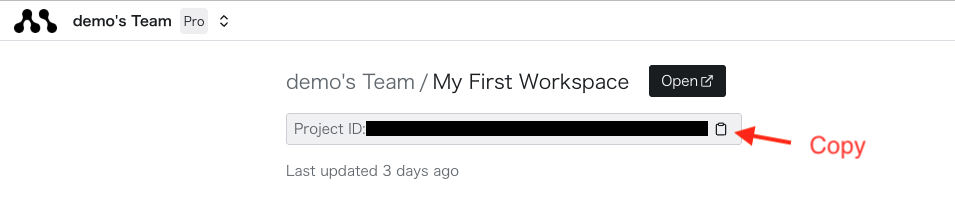
Specifies the ID of the project created in the Morph cloud. This is mandatory when using cloud connectors or performing deployments.
You can retrieve the project ID from the individual project page on the Morph cloud.
 Sets the default database connection. If no connection is explicitly defined in the `config` function of an SQL file, this default connection will be used.
**Reserved Words**
The following reserved words can be used without defining a connection:
* `DUCKDB`: DuckDB is used as the database engine.
* `MORPH_BUILTIN_DB`: Morph's built-in PostgreSQL database engine is used.
To configure a custom connection, set the connection name in the `config` function, consistent with this setting.
Specifies the directories to be used as source paths. Files within these directories are recognized as executable source code in Morph.
Specifies the Python version to be used in the project.
Available Python versions:
* `python3.9`
* `python3.10`
* `python3.11`
* `python3.12`
Specifies the framework to be used in the project.
If a `Dockerfile` does not exist in the project root, a Dockerfile appropriate for the framework set here will be automatically used for deployment.
If a `Dockerfile` exists in the project, it will be used preferentially.
Available frameworks:
* `morph`
* `streamlit`
Specifies the Python package manager type to be used in the project.
Sets the default database connection. If no connection is explicitly defined in the `config` function of an SQL file, this default connection will be used.
**Reserved Words**
The following reserved words can be used without defining a connection:
* `DUCKDB`: DuckDB is used as the database engine.
* `MORPH_BUILTIN_DB`: Morph's built-in PostgreSQL database engine is used.
To configure a custom connection, set the connection name in the `config` function, consistent with this setting.
Specifies the directories to be used as source paths. Files within these directories are recognized as executable source code in Morph.
Specifies the Python version to be used in the project.
Available Python versions:
* `python3.9`
* `python3.10`
* `python3.11`
* `python3.12`
Specifies the framework to be used in the project.
If a `Dockerfile` does not exist in the project root, a Dockerfile appropriate for the framework set here will be automatically used for deployment.
If a `Dockerfile` exists in the project, it will be used preferentially.
Available frameworks:
* `morph`
* `streamlit`
Specifies the Python package manager type to be used in the project.
When creating a project using the [`morph new`](../cli-commands/new) command, the package manager selected on the command line will be set.
Available package managers:
* `pip`
* `poetry`
* `uv`
Specifies the build context path.
This setting is only used when a `Dockerfile` exists in the project.
By default, the project's root directory is set as the context path.
Specifies build arguments to be used during the build process.
This setting is only used when a `Dockerfile` exists in the project.
Build arguments can be used within the Dockerfile.
Specifies the provider to be used for deployment.
Available providers:
* `aws`
* `gcp`
Describes the configuration for deploying to AWS.
Specifies the AWS region.
Specifies the AWS memory allocation (in MiB).
The allocated CPU is automatically calculated based on the memory.
Specifies the AWS timeout (in seconds).
Describes the configuration for deploying to GCP.
Specifies the GCP region.
Specifies the GCP memory allocation. Include units when setting.
Examples: "256Mi", "1Gi", "2Gi"
Specifies the number of GCP vCPUs.
vCPU examples: 1, 2, 4
Specifies the GCP concurrency level.
Specifies the GCP timeout (in seconds).