> ## Documentation Index
> Fetch the complete documentation index at: https://docs.morph-data.io/llms.txt
> Use this file to discover all available pages before exploring further.
# チャットアプリを作成する
Morphでは、LLMのAPIを活用したチャットアプリを簡単に作成して、チームに共有することができます。
このチュートリアルでは、MorphのLLMコンポーネントとOpenAIのAPIを使用して、チャットアプリを作成します。
## 事前準備
このチュートリアルでは、事前に以下のコマンドを使用してパッケージをインストールしてください。
```bash pip theme={"dark"}
pip install openai
```
```bash poetry theme={"dark"}
poetry add openai
```
```bash uv theme={"dark"}
uv add openai
```
OpenAIのAPIキーを事前にOpenAIのダッシュボードから取得して、`.env`ファイルに保存してください。
```shell .env theme={"dark"}
OPENAI_API_KEY=your_api_key
```
## 最終的な成果物
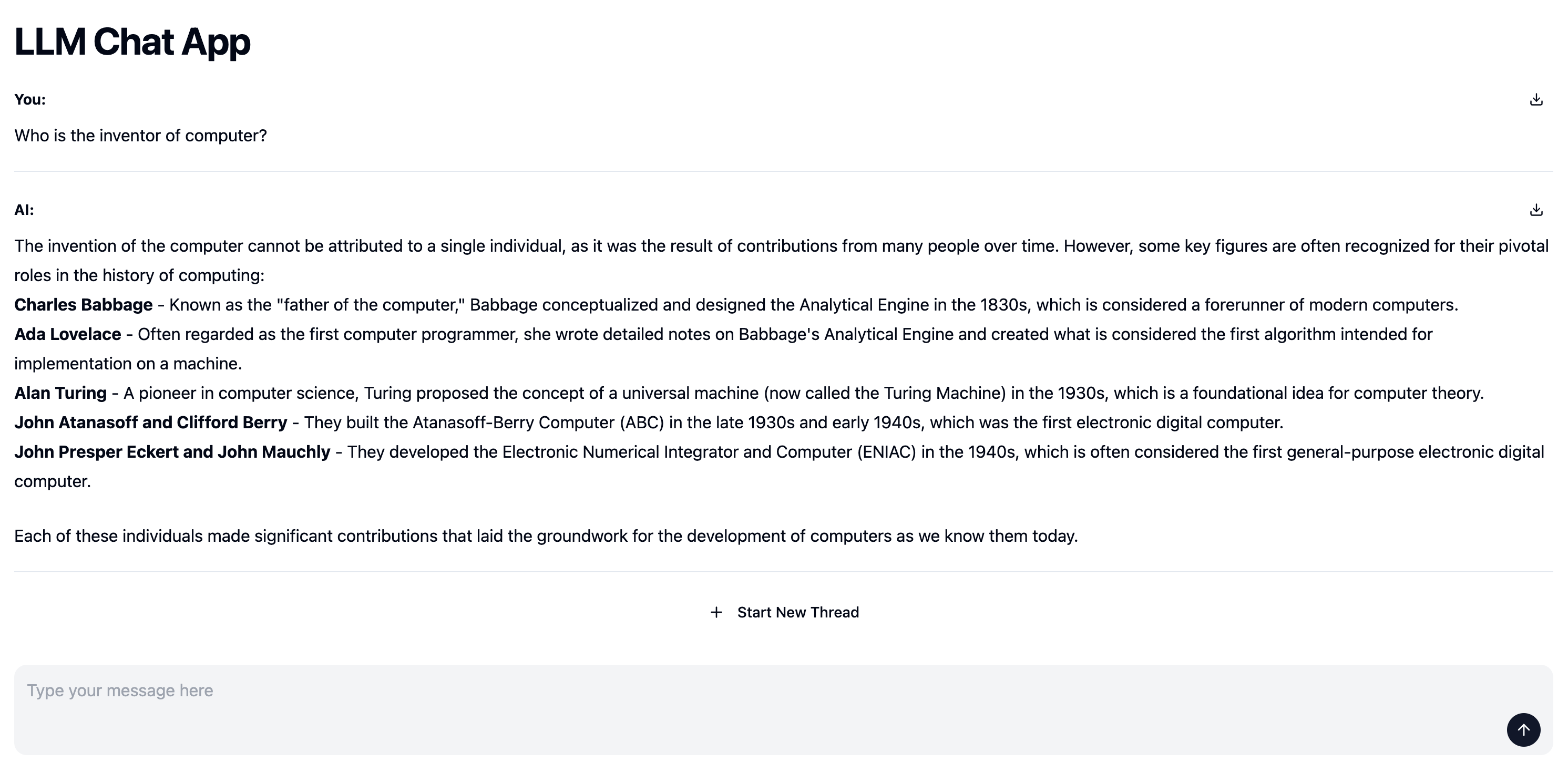 ## チュートリアル
``コンポーネントを使用して、LLMのAPIを活用したチャットアプリを作成します。
Python関数でLLMを用いたチャットアプリのロジックを実装し、`yield`を使用して、チャットのログをストリームで返することで、自動的に``がストリーミングの結果を表示します。
OpenAIのSDKを使用して、ユーザーからの質問に回答するロジックを実装します。
``コンポーネントの`postData`属性に指定された関数は`prompt`と`thread_id`を引数として受け取ります。
* prompt: ユーザーから入力されたプロンプト
* thread\_id: チャットスレッドのID。新しいスレッドが開かれると新しいIDが発行されます。
```python theme={"dark"}
import os
import morph
from morph import MorphGlobalContext
from openai import OpenAI
@morph.func
def llm_chat_app(context: MorphGlobalContext):
client = OpenAI(api_key=os.getenv("OPENAI_API_KEY"))
prompt = context.vars["prompt"]
# thread_id can be used to identify the chat thread
thread_id = context.vars["thread_id"]
# chat
messages = [{"role": "user", "content": prompt}]
response = client.chat.completions.create(
model="gpt-4o",
messages=messages,
stream=True,
)
for chunk in response:
yield chunk.choices[0].delta.content
```
``コンポーネントの`postData`属性にPython関数を指定します。
```typescript theme={"dark"}
export const title = "LLM Chat App"
# Chat App
```
## チュートリアル
``コンポーネントを使用して、LLMのAPIを活用したチャットアプリを作成します。
Python関数でLLMを用いたチャットアプリのロジックを実装し、`yield`を使用して、チャットのログをストリームで返することで、自動的に``がストリーミングの結果を表示します。
OpenAIのSDKを使用して、ユーザーからの質問に回答するロジックを実装します。
``コンポーネントの`postData`属性に指定された関数は`prompt`と`thread_id`を引数として受け取ります。
* prompt: ユーザーから入力されたプロンプト
* thread\_id: チャットスレッドのID。新しいスレッドが開かれると新しいIDが発行されます。
```python theme={"dark"}
import os
import morph
from morph import MorphGlobalContext
from openai import OpenAI
@morph.func
def llm_chat_app(context: MorphGlobalContext):
client = OpenAI(api_key=os.getenv("OPENAI_API_KEY"))
prompt = context.vars["prompt"]
# thread_id can be used to identify the chat thread
thread_id = context.vars["thread_id"]
# chat
messages = [{"role": "user", "content": prompt}]
response = client.chat.completions.create(
model="gpt-4o",
messages=messages,
stream=True,
)
for chunk in response:
yield chunk.choices[0].delta.content
```
``コンポーネントの`postData`属性にPython関数を指定します。
```typescript theme={"dark"}
export const title = "LLM Chat App"
# Chat App
```