> ## Documentation Index
> Fetch the complete documentation index at: https://docs.morph-data.io/llms.txt
> Use this file to discover all available pages before exploring further.
# Role-based Access Control
In data applications built with Morph, you can utilize user information to perform role-based access control.
In Python functions on the Morph framework, you can receive an argument called `context: MorphGlobalContext`.
User information is stored in the `user_info` variable of this `context`.
Details of the user information that can be obtained from the `context.user_info` variable in Python
The type of the `context.user_info` variable is as follows:
| Variable | Description | Type |
| :----------- | :------------------- | :---------- |
| `user_id` | User ID | `str` |
| `email` | User's email address | `str` |
| `username` | User's name | `str` |
| `first_name` | User's first name | `str` |
| `last_name` | User's last name | `str` |
| `roles` | User's project roles | `list[str]` |
## Setting Project Roles
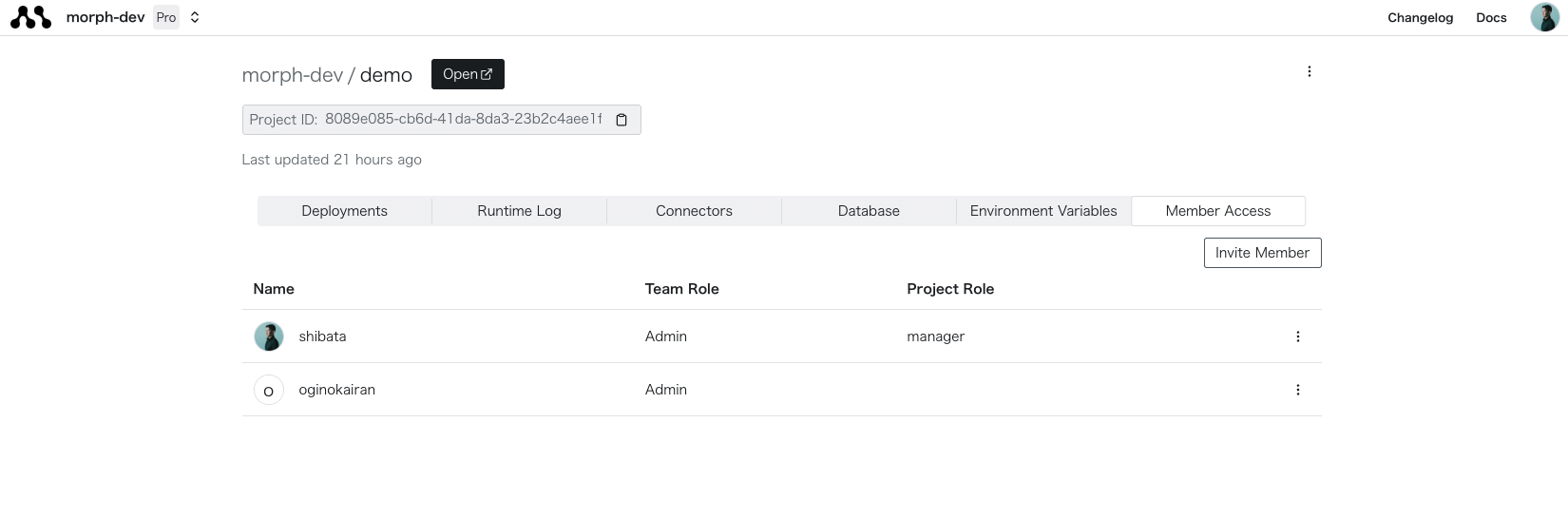
The `roles` variable in the `context.user_info` variable stores the user's project roles.
Project roles are roles that can be set for users in each project. They can be set in the "Member Access" tab of the project details.
 ## Using roles in local environment
Since the development environment does not pass authentication information for the dashboard, the following fixed values are stored in `context.user_info`.
```json theme={"dark"}
{
"user_id": "cea122ea-b240-49d7-ae7f-8b1e3d40dd8f",
"email": "mock_user@morph-data.io",
"username": "mock_user",
"first_name": "Mock",
"last_name": "User",
"roles": ["Admin"],
}
```
### Customizing project roles in local environment
Create a `/path/to/project/.mock_user_context.json` file and save the value in the same type as the above JSON, then the value of `context.user_info` will be automatically switched.
You can implement role-based access control by changing the setting value of `roles`.
You can also switch user information by passing the JSON data as an unsigned JWT token to the authorization header.
## Sample code
The following sample code is for displaying a Pygwalker dashboard only if the user has the Admin role.
```python theme={"dark"}
import pandas as pd
import morph
from morph import MorphGlobalContext
from morph_lib.types import HtmlResponse
import pygwalker as pyg
@morph.func
@morph.load_data("example_data")
def create_pygwalker_dashboard(context: MorphGlobalContext):
data = context.data["example_data"]
if "Admin" not in context.user_info["roles"]:
return HtmlResponse("You are not authorized to access this dashboard.")
return pyg.to_html(data)
```
## Using roles in local environment
Since the development environment does not pass authentication information for the dashboard, the following fixed values are stored in `context.user_info`.
```json theme={"dark"}
{
"user_id": "cea122ea-b240-49d7-ae7f-8b1e3d40dd8f",
"email": "mock_user@morph-data.io",
"username": "mock_user",
"first_name": "Mock",
"last_name": "User",
"roles": ["Admin"],
}
```
### Customizing project roles in local environment
Create a `/path/to/project/.mock_user_context.json` file and save the value in the same type as the above JSON, then the value of `context.user_info` will be automatically switched.
You can implement role-based access control by changing the setting value of `roles`.
You can also switch user information by passing the JSON data as an unsigned JWT token to the authorization header.
## Sample code
The following sample code is for displaying a Pygwalker dashboard only if the user has the Admin role.
```python theme={"dark"}
import pandas as pd
import morph
from morph import MorphGlobalContext
from morph_lib.types import HtmlResponse
import pygwalker as pyg
@morph.func
@morph.load_data("example_data")
def create_pygwalker_dashboard(context: MorphGlobalContext):
data = context.data["example_data"]
if "Admin" not in context.user_info["roles"]:
return HtmlResponse("You are not authorized to access this dashboard.")
return pyg.to_html(data)
```