> ## Documentation Index
> Fetch the complete documentation index at: https://docs.morph-data.io/llms.txt
> Use this file to discover all available pages before exploring further.
#
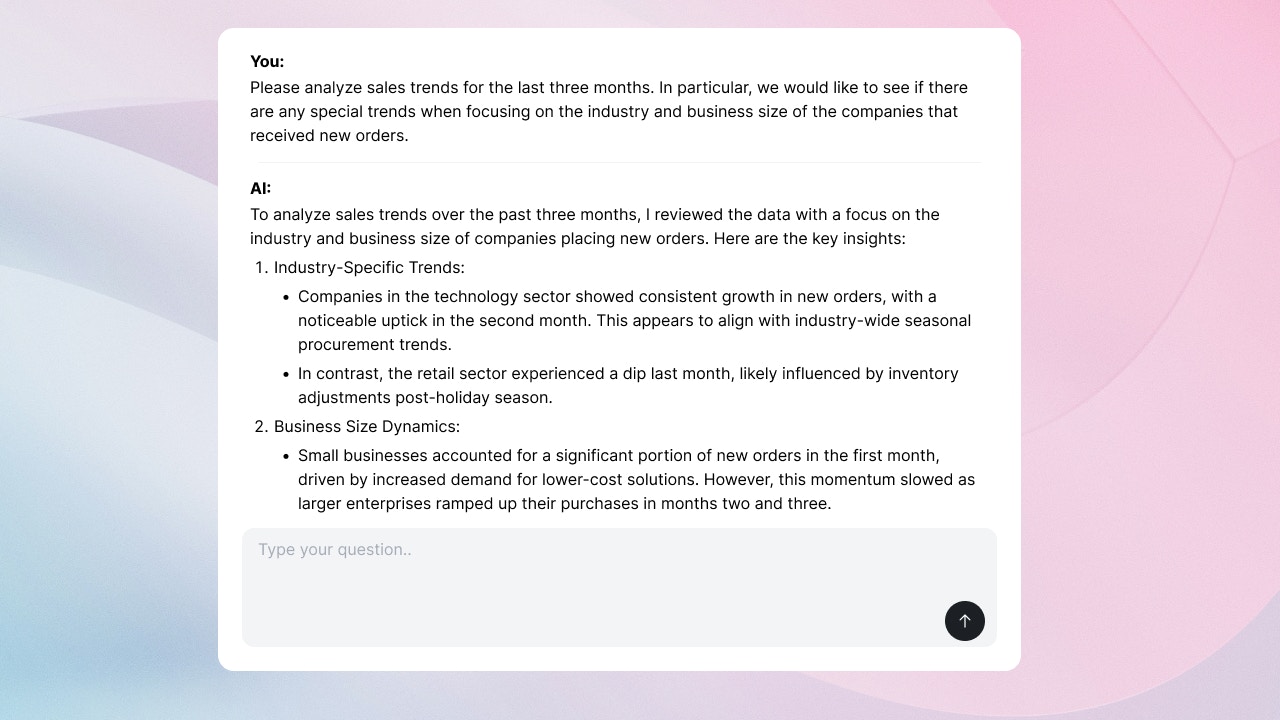 `` コンポーネントは、Open AIやAnthropicのAPIを用いたストリーミング処理を実現するためのコンポーネントです。
```tsx theme={"dark"}
```
`` コンポーネントを使うことで以下のような機能を実現できます。
* AIチャット ... ユーザーとAIのチャットが実現できます。スレッドの開始や終了、AIの返答の表示などが可能です。
* コンテンツ生成 ... ユーザーが入力したテキストに対してAIがコンテンツを生成します。例えば、ユーザーが入力したテキストに対してAIがドキュメントを生成する際などに利用できます。
* サイド・バイ・サイド ... ユーザーとAIのチャットと、コンテンツ生成を横並びで表示します。
## `` のデータ仕様
`` コンポーネントは `postData` で指定されたPython関数に対して、以下のデータをデフォルトで送信します。
* `prompt`: ユーザーが入力したテキスト
* `thread_id`: AIとの会話のスレッドID。 "Start new thread" ボタンをユーザーが押した際などに新しい値に更新されます。
* `is_new_conversation`: 新しい会話が始まったかどうか。 "Start new thread" ボタンをユーザーが押した際などに `true` に更新されます。
これらのデータに加えて送りたいデータや、デフォルトのデータを上書きしたい場合には、 `variables` プロパティを使用してください。
## プロパティ
Python関数やSQLファイルの name
Python関数やSQLファイルに渡す変数。 `defineState()`関数 を使って宣言してください。
コンポーネントの高さ。単位はpxです。
UIのレイアウト。 'chat' の場合にはチャットUIが、 'single' の場合にはコンテンツ生成UIが、 'side-by-side' の場合にはサイド・バイ・サイドUIが表示されます。
入力フォームの形式。 'default' の場合にはデフォルトの入力フォームが、 'button' の場合にはボタンだけが表示されます。
## Example
### Side-by-side layout
Side-by-sideレイアウトを用いることで、ユーザーとAIのチャットと、成果物を同時に表示することができます。
`create_chunk` 関数を使ってください。第1引数にはチャットの内容、第2引数には成果物の内容を指定します。成果物は、HTMLか、マークダウンが使用できます。
```python src/python/ai-chat-with-html.py theme={"dark"}
# src/python/ai-chat-with-html.py
from langchain_core.messages import HumanMessage
from langchain_openai import ChatOpenAI
from morph_lib.stream import create_chunk
import morph
from morph import MorphGlobalContext
@morph.func
def langchain_chat(context: MorphGlobalContext):
llm = ChatOpenAI(model="gpt-4o")
messages = [HumanMessage(context.vars["prompt"])]
for token in llm.stream(messages):
yield create_chunk(f"{token.content}")
yield create_chunk(f"", f"
`` コンポーネントは、Open AIやAnthropicのAPIを用いたストリーミング処理を実現するためのコンポーネントです。
```tsx theme={"dark"}
```
`` コンポーネントを使うことで以下のような機能を実現できます。
* AIチャット ... ユーザーとAIのチャットが実現できます。スレッドの開始や終了、AIの返答の表示などが可能です。
* コンテンツ生成 ... ユーザーが入力したテキストに対してAIがコンテンツを生成します。例えば、ユーザーが入力したテキストに対してAIがドキュメントを生成する際などに利用できます。
* サイド・バイ・サイド ... ユーザーとAIのチャットと、コンテンツ生成を横並びで表示します。
## `` のデータ仕様
`` コンポーネントは `postData` で指定されたPython関数に対して、以下のデータをデフォルトで送信します。
* `prompt`: ユーザーが入力したテキスト
* `thread_id`: AIとの会話のスレッドID。 "Start new thread" ボタンをユーザーが押した際などに新しい値に更新されます。
* `is_new_conversation`: 新しい会話が始まったかどうか。 "Start new thread" ボタンをユーザーが押した際などに `true` に更新されます。
これらのデータに加えて送りたいデータや、デフォルトのデータを上書きしたい場合には、 `variables` プロパティを使用してください。
## プロパティ
Python関数やSQLファイルの name
Python関数やSQLファイルに渡す変数。 `defineState()`関数 を使って宣言してください。
コンポーネントの高さ。単位はpxです。
UIのレイアウト。 'chat' の場合にはチャットUIが、 'single' の場合にはコンテンツ生成UIが、 'side-by-side' の場合にはサイド・バイ・サイドUIが表示されます。
入力フォームの形式。 'default' の場合にはデフォルトの入力フォームが、 'button' の場合にはボタンだけが表示されます。
## Example
### Side-by-side layout
Side-by-sideレイアウトを用いることで、ユーザーとAIのチャットと、成果物を同時に表示することができます。
`create_chunk` 関数を使ってください。第1引数にはチャットの内容、第2引数には成果物の内容を指定します。成果物は、HTMLか、マークダウンが使用できます。
```python src/python/ai-chat-with-html.py theme={"dark"}
# src/python/ai-chat-with-html.py
from langchain_core.messages import HumanMessage
from langchain_openai import ChatOpenAI
from morph_lib.stream import create_chunk
import morph
from morph import MorphGlobalContext
@morph.func
def langchain_chat(context: MorphGlobalContext):
llm = ChatOpenAI(model="gpt-4o")
messages = [HumanMessage(context.vars["prompt"])]
for token in llm.stream(messages):
yield create_chunk(f"{token.content}")
yield create_chunk(f"", f"Hey! It's Canvas
")
```
```tsx src/pages/index.mdx theme={"dark"}
# AI App 🦜
```