> ## Documentation Index
> Fetch the complete documentation index at: https://docs.morph-data.io/llms.txt
> Use this file to discover all available pages before exploring further.
#
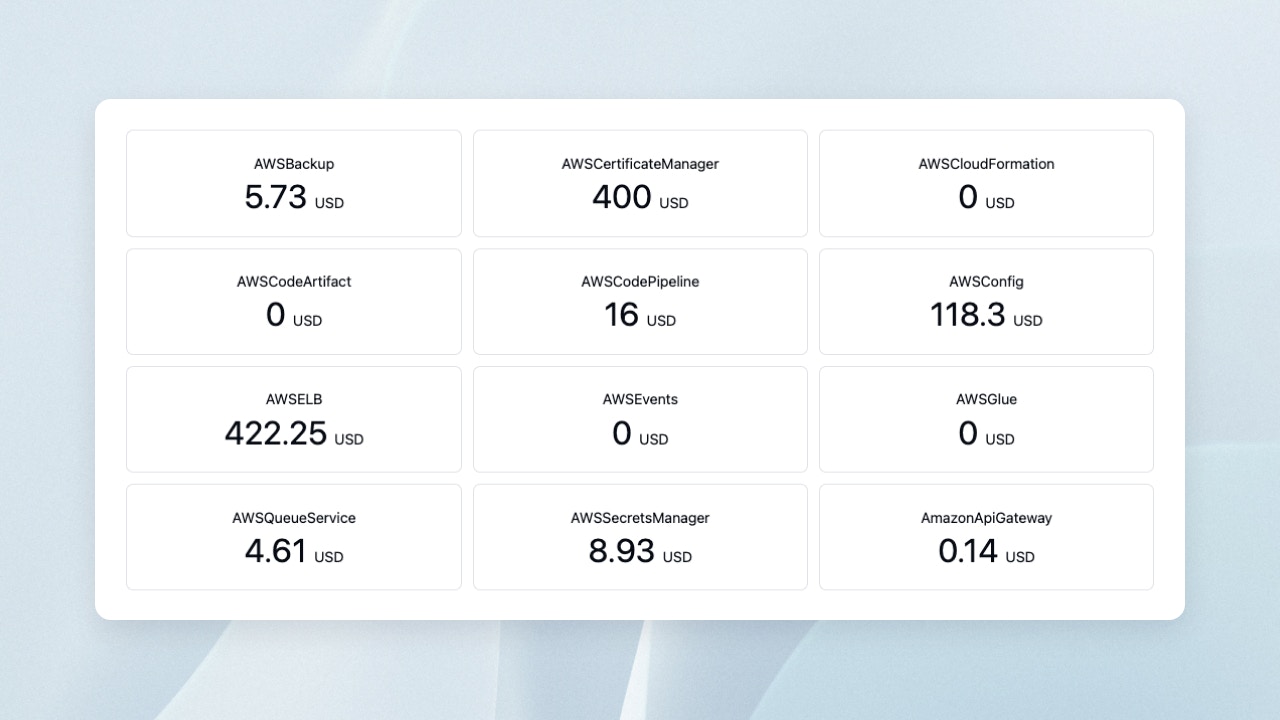 # MetricsGrid
The MetricsGrid component displays each row of the execution results of Python functions or SQL files using the Metrics component.
The display is in grid format.
```tsx theme={"dark"}
"$"}
suffix={() => "/mo"}
footer={(item) => (
{`${item["usage"]["instance_type"]}`}, {item["region"]}
)}
/>
```
## Properties
The name of the Python function or SQL file
Variables to pass to the Python function or SQL file. Declare them using the `defineState()` function.
Controls the value displayed in the center of the card.
If a function is passed, its execution result is treated as the Value. If a string is passed, it is treated as the column name, and the column value is treated as the Value.
Controls the string displayed above the value.
If a function is passed, its execution result is treated as the label. If a string is passed, it is treated as the column name, and the column value is treated as the label.
Controls the string displayed to the left of the Value.
If a function is passed, its execution result is treated as the Prefix. If a string is passed, it is treated as the column name, and the column value is treated as the Prefix.
Controls the string displayed to the right of the Value.
If a function is passed, its execution result is treated as the Suffix. If a string is passed, it is treated as the column name, and the column value is treated as the Suffix.
Controls the string displayed at the bottom of the card.
If a function is passed, its execution result is displayed as the Footer.
# Metrics
The Metrics component displays the value of a specific column from the **first row** of the execution results of Python functions or SQL files.
```tsx theme={"dark"}
"$"}
suffix={() => "/mo"}
footer={(item) => (
{`${item["usage"]["instance_type"]}`}, {item["region"]}
)}
/>
```
## Properties
The name of the Python function or SQL file
Variables to pass to the Python function or SQL file. Declare using the `defineState()` function.
Controls the value displayed in the center of the card.
If a function is passed, its execution result is treated as the Value. If a string is passed, it is treated as the column name, and the column value is treated as the Value.
Controls the string displayed above the value.
If a function is passed, its execution result is treated as the label. If a string is passed, it is treated as the column name, and the column value is treated as the label.
Controls the string displayed to the left of the Value.
If a function is passed, its execution result is treated as the Prefix. If a string is passed, it is treated as the column name, and the column value is treated as the Prefix.
Controls the string displayed to the right of the Value.
If a function is passed, its execution result is treated as the Suffix. If a string is passed, it is treated as the column name, and the column value is treated as the Suffix.
Controls the string displayed at the bottom of the card.
If a function is passed, its execution result is displayed as the Footer.
# MetricsGrid
The MetricsGrid component displays each row of the execution results of Python functions or SQL files using the Metrics component.
The display is in grid format.
```tsx theme={"dark"}
"$"}
suffix={() => "/mo"}
footer={(item) => (
{`${item["usage"]["instance_type"]}`}, {item["region"]}
)}
/>
```
## Properties
The name of the Python function or SQL file
Variables to pass to the Python function or SQL file. Declare them using the `defineState()` function.
Controls the value displayed in the center of the card.
If a function is passed, its execution result is treated as the Value. If a string is passed, it is treated as the column name, and the column value is treated as the Value.
Controls the string displayed above the value.
If a function is passed, its execution result is treated as the label. If a string is passed, it is treated as the column name, and the column value is treated as the label.
Controls the string displayed to the left of the Value.
If a function is passed, its execution result is treated as the Prefix. If a string is passed, it is treated as the column name, and the column value is treated as the Prefix.
Controls the string displayed to the right of the Value.
If a function is passed, its execution result is treated as the Suffix. If a string is passed, it is treated as the column name, and the column value is treated as the Suffix.
Controls the string displayed at the bottom of the card.
If a function is passed, its execution result is displayed as the Footer.
# Metrics
The Metrics component displays the value of a specific column from the **first row** of the execution results of Python functions or SQL files.
```tsx theme={"dark"}
"$"}
suffix={() => "/mo"}
footer={(item) => (
{`${item["usage"]["instance_type"]}`}, {item["region"]}
)}
/>
```
## Properties
The name of the Python function or SQL file
Variables to pass to the Python function or SQL file. Declare using the `defineState()` function.
Controls the value displayed in the center of the card.
If a function is passed, its execution result is treated as the Value. If a string is passed, it is treated as the column name, and the column value is treated as the Value.
Controls the string displayed above the value.
If a function is passed, its execution result is treated as the label. If a string is passed, it is treated as the column name, and the column value is treated as the label.
Controls the string displayed to the left of the Value.
If a function is passed, its execution result is treated as the Prefix. If a string is passed, it is treated as the column name, and the column value is treated as the Prefix.
Controls the string displayed to the right of the Value.
If a function is passed, its execution result is treated as the Suffix. If a string is passed, it is treated as the column name, and the column value is treated as the Suffix.
Controls the string displayed at the bottom of the card.
If a function is passed, its execution result is displayed as the Footer.